Public Access
Libraries as Today's Public Access Points
Public libraries inherited the free-net role: free computers, wifi, hotspot lending and staff who help people get online.
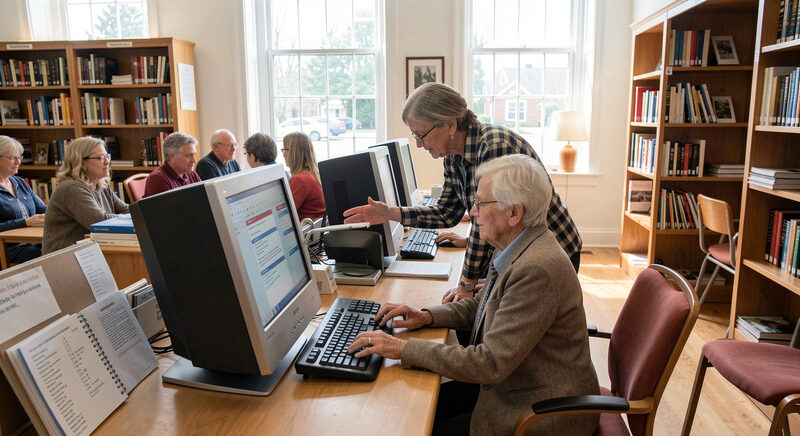
If the free-net had a physical heir, it is the public library computer row. Libraries did not set out to replace community networks, but they inherited the same job: free access to the networked world for anyone who walks in. What a modern library offers goes well past a bank of desktops, and knowing the full menu is worth an hour of any household's time.
The reading room became an access point
The transition happened gradually. Public internet terminals appeared in libraries through the 1990s, alongside the catalog terminals they were slowly replacing. By the time the free-nets wound down, the library was already the default public access point in most American towns, a role it still holds. The difference is that today the access is often the reason for the visit.
The institutional fit is natural. A library is already free at the point of use, already trusted, already staffed by people whose job is helping the public find and use information. Public computing is the same mission with newer equipment.
What libraries actually provide
The baseline is a row of public computers with internet access, a browser, office software and printing, typically available with a library card or a guest pass. On top of that, most systems offer free wifi reachable from the reading room and often from the parking lot after hours, a detail worth knowing for households with a device but no subscription.
Many libraries also lend objects, not just access: mobile hotspots that put a cellular connection in a home for a week or a month, laptops and tablets, even chargers and headphones. Hotspot lending in particular has become a quiet workhorse of digital inclusion, and a cardholder can usually reserve one like a book.
The staff is the service
Hardware is only half of what a library provides. Reference staff and dedicated digital navigators help patrons through the tasks that stall people: creating an email account, resetting a password, completing an online benefits form, attaching a document to a job application. Many systems run scheduled classes on basics like searching, file storage and recognizing scams.
This help function is the direct descendant of the free-net help desk described in the registration guide, the volunteer who walked a new member through a first login. The patron facing a government portal for the first time needs the same patience.
How is library access different from a home subscription?
The differences are real and worth stating honestly. Access is bounded by opening hours and session limits. A queue forms at busy branches. Sensitive tasks are harder in a shared space. And a hotspot loan ends where a subscription does not. Library access is a floor, not a full substitute for home service, which is why the price-side options in the low-cost guide matter alongside it.
How it is funded, and why that matters
Public computing in libraries is not free to run; it is free at the point of use, which is the distinction the free-nets also lived on. The money comes from municipal budgets, state library programs, federal programs like E-rate that discount connectivity for libraries and schools, and local friends-of-the-library fundraising. The funding structure explains the service's limits: hours track city budgets, equipment ages on refresh cycles, and hotspot lending pools stay small relative to demand. It also explains the service's strength, since a line item in a municipal budget is more durable than a volunteer donation drive, the fragility documented in Network History.
Using it well
A few habits make library access go further. Get the library card first, since it unlocks reservations and lending beyond the walk-in terminals. Ask about hotspot and device loans even if no sign advertises them, since lending rules are often posted only at the desk. Check whether the wifi reaches the parking lot for after-hours use, and ask staff directly for help rather than struggling alone, since that help is the service.
For a household doing the math, the combination of library access for heavy tasks and a low-cost or subsidized plan at home is often the workable middle path.
The limits worth naming
Honest coverage requires the weak points. Rural branches keep shorter hours and hold smaller collections of everything, including hotspots. Demand for lending devices routinely exceeds supply, and waiting lists can run weeks. Public computers carry session limits that cut off long applications at the worst moment. And none of it reaches someone who cannot get to a branch at all, which is why the mobile and home options in the low-cost guide remain necessary alongside the library rather than redundant with it.
Why this is the free-net's heir
The free-nets covered in Network History ran on the premise that a community owes its members a way online. The library inherited that premise and institutionalized it, with funding, hours and professional staff the volunteer systems never had. When community builds like those in Community Builds look for an anchor partner, the library is usually the first door they knock on, for exactly that reason. The American Library Association documents the public-access role on ala.org, including the scale of library computing nationwide.
None of this makes the library a panacea. It makes it the most reliable public access institution the country currently operates, which is why every serious digital inclusion strategy either runs through a library or explains why it cannot.
The page describes how public libraries took over the free-net role, offering computers, wifi and hotspot lending to residents who lacked connections at home. That work still depends on the machines behind the desk, and the guide on this site titled "Mac Database Clients and Task Scheduling" covers a related corner of it: how to choose a SQL client on macOS, what SyBrowser did from 1999, and how administrators set up cron-style task scheduling on macOS such as MacAT. Staff who keep catalog and patron systems running on Macs may find the same questions of clients and scheduled jobs familiar.